How to Redeem Spot the Fake For Anime Codes
Find the Codes button, paste cleanly, and fix the most common redeem errors.
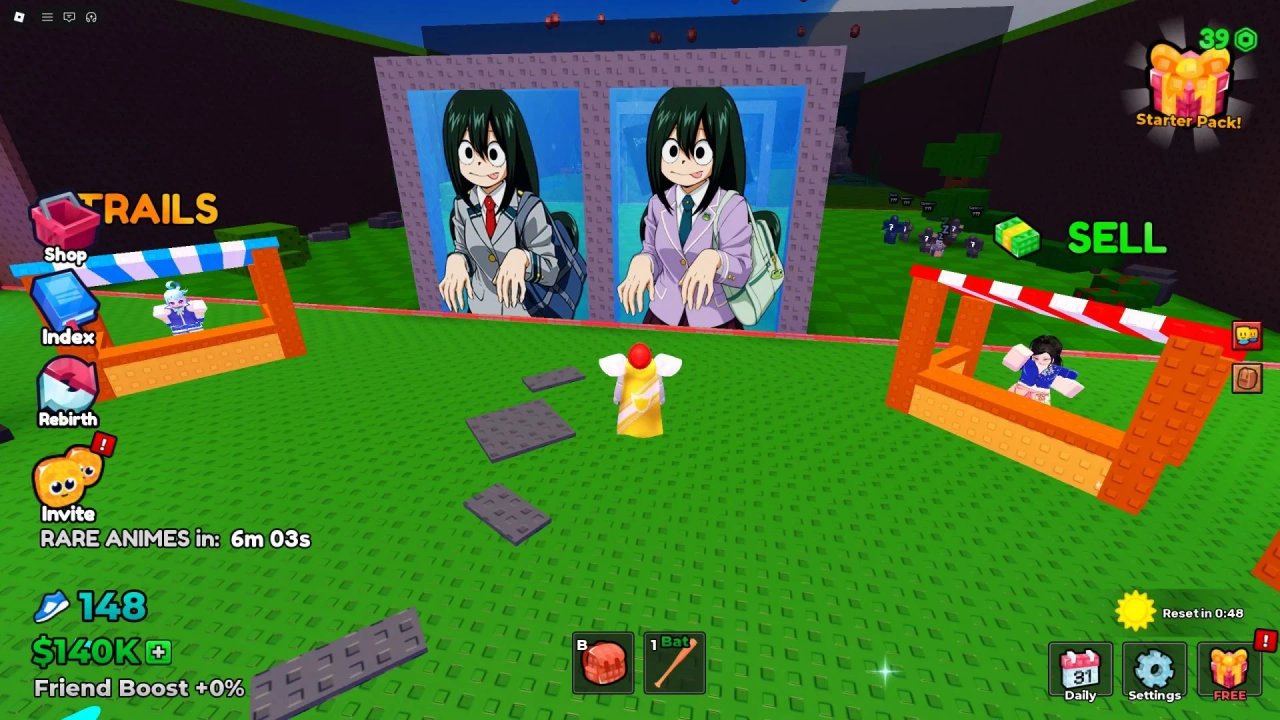
Redeeming codes in Spot the Fake For Anime takes less than a minute once you know where the HUD button lives. This guide walks through the full flow, common failure messages, and how to spend rewards so they actually speed up your first steals. For the live table of strings, keep the Codes Hub open in another tab.
Before you redeem
- Update Roblox and relaunch the experience so you are on a current build.
- Join a normal public server (not a private test place) so UI buttons load.
- Copy a single code from the Codes Hub — no spaces, no extra punctuation.
- Decide what you will buy first if the reward is Cash (speed and base upgrades beat cosmetics early).
Codes are account-bound per experience. Redeeming on a secondary account does not transfer Cash or cosmetics to your main.
Step-by-step redemption
1. Launch and load in
Open Spot the Fake For Anime from the Roblox place page (Place ID 126546868403353) and wait until your base, treadmill, and gateway UI finish loading. Redeeming while still on the loading screen often fails silently.
2. Open the Codes / Redeem panel
Look along the left or right edge of the HUD for a Codes button. Many 20XX Studio builds use a Twitter / X bird icon or a gift / ticket icon that expands into a text field. On mobile, tap the side arrow if the menu is collapsed, then open Codes.
If you cannot find it:
- Toggle the menu arrow so side buttons expand.
- Check Settings or the main hamburger for a Codes tab.
- Rejoin once; a stuck UI layer can hide the button after a failed steal or combat.
3. Paste one code
Click the text box, paste the code exactly as listed (for example ANIMEPRO or FAKEBUSTERS), and remove accidental spaces. Codes are usually case-sensitive enough that mixed case from chat screenshots can break them — prefer the uppercase forms listed on the hub.
4. Confirm and wait for feedback
Press the green checkmark or Redeem button. A success toast should name the reward (cosmetic, currency pack, boost, and so on). A failure toast usually says invalid, expired, or already redeemed. Do not mash the button; wait a second between attempts.
5. Apply the reward
Currency packs land in your Cash balance. Cosmetics appear in inventory or avatar slots. Temporary boosts start on a timer — use that window to clear a gateway, steal, and podium a character before the multiplier ends. Collect Cash from green podium buttons after deliveries so the boost feeds upgrades, not idle pockets.
Troubleshooting redeem errors
| Message / symptom | Likely cause | Fix |
|---|---|---|
| Invalid code | Typo, wrong game, or never existed | Recopy from Codes; confirm it is for Spot the Fake For Anime |
| Expired | Promo ended | Move on; check the expired section on the hub |
| Already redeemed | Same account claimed it earlier | Nothing to do on this account |
| No response | UI lag or offline blip | Rejoin, reopen Codes, try once more |
| Button missing | Collapsed HUD or old client | Expand side menu, update Roblox, rejoin |
Never share your Roblox password or cookie with “code bots.” Legitimate redemption happens only inside the official client.
Community-reported codes to try
These remain listed as community-reported — verify in-game until you see a success toast yourself:
ANIMEPRO— unique cosmeticFAKEBUSTERS— bonus currencyFREEREWARD2024— exclusive boostOTAKUPOWER— limited accessoryGOLDENSTAR— special currency packSUPERBOOST— temporary multiplier
Expired example: WELCOMETOANIME — do not retry it.
Aggregator sites for this title have been unreliable. Prefer official group shouts, experience description updates, and in-game banners. This wiki will not invent new codes.
Best order after a successful redeem
- Spend Cash on treadmill speed so wrong-door penalties and guard chases are easier to survive — see Controls and How to Spot the Fake.
- Upgrade the base so podium income rises when you steal and place characters.
- Unlock Trails once movement and income feel stable.
- Push toward Rebirth unlocks when requirements are in reach — Rebirth Guide.
- Keep an eye on rare variant notifications via the Players hub once farming is comfortable.
If you are brand new, redeem codes first, then follow Getting Started so the free Cash lands in a planned upgrade path instead of random shop clicks.
Mobile vs PC notes
On PC, paste with Ctrl+V into the Codes field, then click Redeem. On mobile, long-press to paste; watch for autocorrect inserting spaces. Landscape mode often makes the side Codes icon easier to tap. After redeeming a boost, switch back to WASD / thumbstick movement quickly so you do not waste the timer standing at spawn.
Safety checklist
- Redeem only in the official Roblox client.
- Never enter codes on external “generator” websites.
- Do not trade account access for someone else to redeem for you.
- Cross-check any new string against the Codes Hub and official channels before sharing it in chat.
Mastering redemption is a small skill, but pairing free rewards with correct door reads and clean escapes is what turns a promo into real progression. When you are ready for the next loop, return to Codes for the latest table, then dive back into guides for door spotting, stealing, and Rebirth planning.
Frequently Asked Questions
Quick answers to the most common questions.
Where is the Codes button in Spot the Fake For Anime?
Usually on the side HUD as a Codes label or Twitter / X bird icon. Expand the menu arrow on mobile if side buttons are hidden.
Why does my code say invalid?
Most often a typo, extra space, wrong game, or an expired string. Recopy from the Codes Hub and try once more after rejoining.
Can I redeem the same code twice?
No. Each code is typically once per account. Already redeemed means that account already claimed it.
Do codes work on mobile?
Yes. Paste carefully so autocorrect does not add spaces, then confirm Redeem the same way as on PC.
What should I buy with code Cash?
Treadmill speed and base upgrades first, then Trails. That order supports safer steals and faster podium income.
Is WELCOMETOANIME still active?
No. It is listed as expired on the Codes Hub. Skip it and try the community-reported active table instead.